
- 99.99%RELIABLE SYSTEM UPTIME
- +35%INCREASE IN CALL RESPONSES
- 250K+CONVERSATIONS HANDLED
- 4K+WORKING HOURS SAVED
How Rossy AI Answers Your Venue Intercom
Answers the intercom call
Your entrance intercom calls Rossy AI the same way it would call another configured telephone or SIP destination. Rossy answers the call, greets the customer in your venue’s name, and starts the appropriate workflow.
- Answers configured intercom calls 24/7, including evenings, weekends and holidays
- Can handle multiple calls at once, so a busy Saturday does not leave customers waiting outside
- Identifies which entrance and which location the call came from on multi-site operations
Identifies the customer and the booking
Rossy AI checks existing systems first and only asks the caller for information that is not already available.
- Asks for the reservation details, customer name or phone number
- Uses existing data when available, without asking the caller to repeat it
- Establishes whether the caller is the booked guest who made the reservation, a group organizer, or a player arriving separately from their group
- If the details do not return a match, asks for another identifier and searches again before escalating
Applies your venue access rules
Rossy AI checks the caller’s details against your venue’s access rules, not just your records.
- Confirms the gaming session, scheduled time and assigned game room
- Checks whether the customer is within your permitted arrival window
- Confirms the number of players expected against the booking
- Applies your configured rules on early arrivals, late arrivals, membership or pass validity, and group access
Performs the required actions
Once Rossy AI knows who is calling and why, it carries out the action that situation requires, based on your configured workflow.
- Send the configured DTMF command after authorization on a tested, compatible intercom, or direct the caller to the approved next step.
- Provides room and check-in instructions, including which game room the session is assigned to and where to go first
- Answers questions about session times, group size, age requirements and venue rules, and completes other predefined actions required for the interaction
Escalates anything it cannot verify
When required checks cannot be completed, Rossy follows your deny-or-escalate rules. An unverified request does not trigger an automated release command.
- Asks the caller to repeat or provide a second approved detail before escalating
- Explains clearly why the door cannot be unlocked yet
- Transfers booking conflicts and unverified groups to your venue operator
- Routes emergencies immediately according to your written procedure
Records every call and every outcome
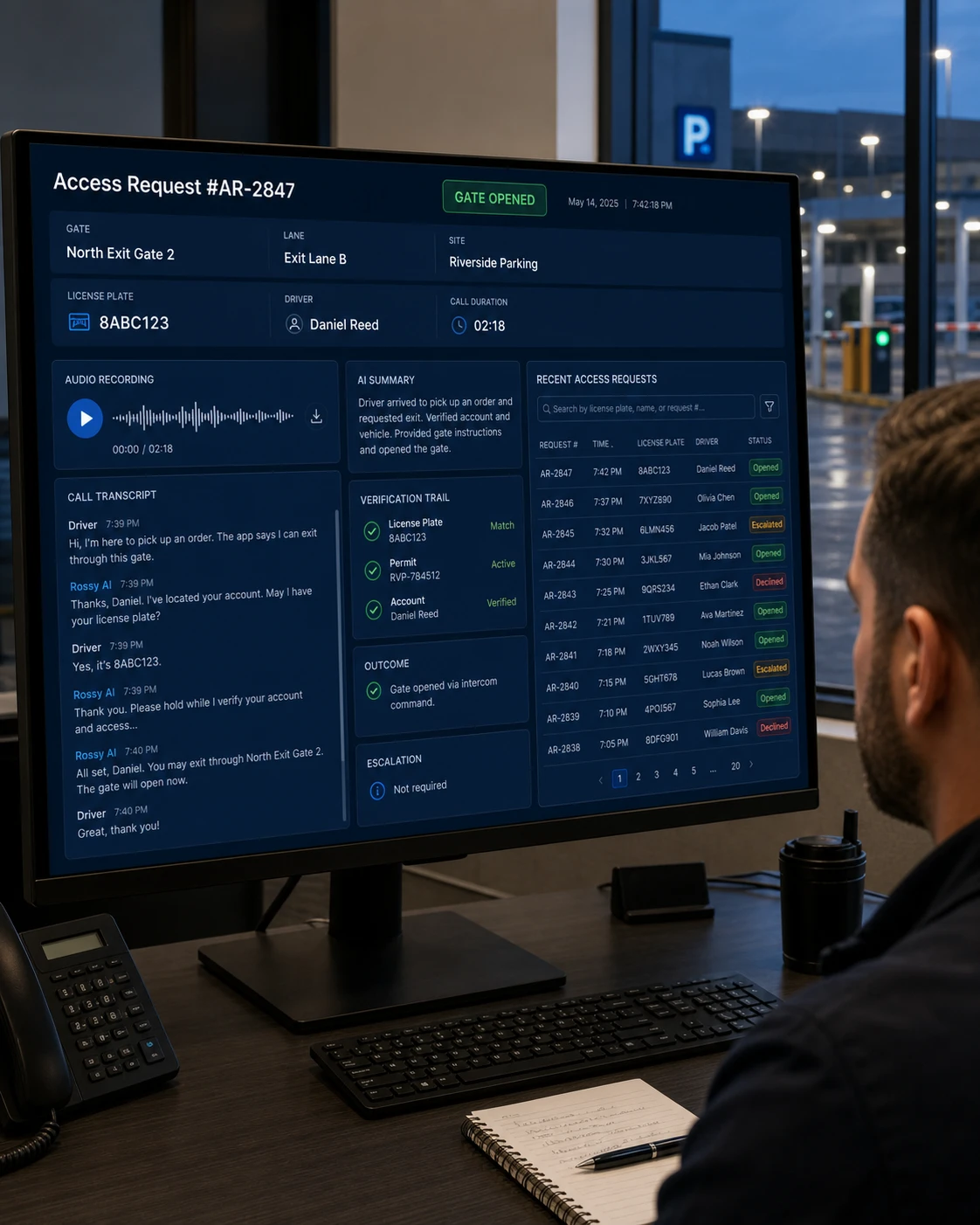
Every interaction is logged with call details, verification results and access outcomes, giving your team complete visibility into every entrance request.
- Full recording, transcript and AI summary of each call
- Records what was verified, which system was checked, and whether the entrance door was unlocked
- Searchable by date, location, entrance, customer and outcome
From Intercom Call to Access Decision in Seconds
Gaming venues get their entrance calls in bursts. A group of eight turns up at once, one person made the booking, and the rest are standing outside while somebody hunts for a phone.
Traditional Venue Entrance Workflow
- A customer presses the entrance intercom.
- A staff member has to break away from a session to answer
- Or the call forwards to a manager who is not on site
- The caller explains who they are and who booked
- Somebody opens a laptop to find the reservation
- They decide whether the group should be let in
- They unlock the door and explain where to go
- Groups arriving at once queue outside the venue
- No record exists of who was let in, or on what basis
With Rossy AI
- A customer presses the entrance intercom.
- Rossy answers the routed call
- Identifies the customer or group organizer using available data
- Collects the reservation, name or phone number
- Checks the connected authorized system
- Applies your configured arrival and group rules
- Unlocks the entrance door when authorized
- Provides room and check-in instructions
- Escalates booking conflicts and unverified groups to a person
- Records the interaction and outcome
How DTMF Door Access Works
DTMF stands for dual-tone multi-frequency. It is the technology behind the tones a telephone keypad produces when a key is pressed.
Telephone and SIP intercoms have accepted these tones as a remote door-release command for years. When a staff member presses a key on their phone to let a group into the venue, the intercom hears that tone and triggers the relay connected to the door strike.
Rossy AI uses the same mechanism. After the required authorization conditions have been satisfied, it sends your intercom’s configured tone through the call that is already connected. The intercom or associated access system interprets that command and activates its configured relay, and the entrance door unlocks.
We check your existing intercom, DTMF configuration and relay connection. Compatible systems may use existing hardware; any required changes are confirmed before deployment.
What Rossy AI Can Validate
Rossy AI verifies against the system that already holds your booking records.
| Information | What Rossy AI checks |
|---|---|
|
Reservation number
| Whether the reservation exists, is active, and is for this location |
|
Customer name
| Name against active booking and customer records |
|
Phone number
| Caller identity against the reservation or account |
|
Scheduled session
| Session type, start time and duration for this booking |
|
Number of players
| Expected group size against the booking, and whether extras are permitted |
|
Assigned room
| Which game room the session is booked into, so Rossy can direct the group |
|
Membership or pass
| Whether a membership, pass or credit package is active and applicable |
|
Arrival window
| Whether the caller is arriving within your permitted early or late window |
Does Rossy AI Work With Your Venue Intercom?
DTMF door access requires a compatible telephone or SIP intercom, connected to a door relay or access system, and configured to accept remote DTMF commands.
Generally compatible
- Entrance intercoms and call boxes that dial out to a phone number
- SIP and VoIP intercoms on a network connection
- Cellular-connected entry panels at unattended or partly staffed venues
- Systems where a staff member already unlocks the door using a keypad tone
Needs review before we commit
- Intercoms with no outbound dialing capability
- Panels wired only to a handset inside the venue
- Systems where remote door release has been disabled in configuration
- Older analog units with no documented DTMF release command
- App-only smart locks with no intercom or telephone path
Connect Rossy AI With Your Existing Venue Systems
Rossy AI connects to the systems that already hold your booking records, so verification runs against live data rather than a static list.
Setup is handled by our team. There is no code to write on your side.
Complete Visibility Into Every Access Request
Every intercom call produces a record, so you can answer what door hardware alone cannot: who asked to come in, and what happened next.
- Full call recording and transcript for every interaction
- AI summary of who called, from which entrance, why, and what was decided
- Verification trail showing which system was checked and what was confirmed
- Access outcome recorded as unlocked, declined, or escalated
- Entrance and location identification across multi-site operations
- Escalation log showing who was transferred to and when
- Searchable history by date, location, entrance, customer or outcome
How We Set Up Rossy AI for Your Gaming Venue
Review Your Entrance Intercom Environment
We identify how your entrance intercom receives calls, how the door is currently unlocked, and whether the system supports the required remote access workflow.
Define Your Venue Access Rules
Determine your arrival window, how groups are handled when only one person booked, what happens with late arrivals and booking conflicts, and which situations require escalation.
Connect the Required Systems
Configure applicable integrations with your reservation, venue management, membership or access control platforms.
Configure DTMF & Call Routing
For compatible intercoms, configure the required call routing, DTMF command, and door relay behavior for each entrance and location.
Test Every Access Scenario
Test successful arrivals, early and late arrivals, split groups, booking conflicts, failed verification, unverified callers, transfer workflows and emergency routing before deployment.
Go Live & Monitor
We review early calls and refine your workflow. Your team can review outcomes and request ongoing support.
Ready to Automate Your Venue Entrance?
Tell us how your current entrance intercom and booking system works, and we will help determine the right Rossy AI setup for your venue.
Frequently Asked Questions
Can Rossy AI verify a gaming session reservation?
Yes, when the appropriate authorized system or integration is available. Rossy can check the reservation number, customer name, phone number and scheduled session against the connected source before triggering an authorized action.
What happens when a group arrives but only one person made the booking?
Rossy applies your configured group rules. It can confirm the group organizer against the reservation, check the expected number of players, and unlock the entrance for the group. Where the numbers do not match your booking, it escalates to your venue operator rather than deciding on its own.
Can Rossy AI tell customers which game room they are in?
Yes, where the assigned room is available in the connected booking system. Rossy can provide room and check-in instructions as part of the same call.
What happens if a customer arrives before their session time?
Rossy follows your configured arrival window. If your rules allow entry a set number of minutes early, Rossy applies that rule. If the caller is outside the window, Rossy explains the session time and either declines the automated action or escalates according to your policy.
Can Rossy AI handle several entrance calls at the same time?
Yes. Rossy answers configured intercom calls concurrently, so groups arriving together on a busy evening are not left queuing outside while one call is handled.
How does Rossy AI send the DTMF door-release command?
It sends the configured tone through the telephone or SIP call that is already connected, in the same way a staff member pressing a key on their phone would. The intercom receives the command and activates its connected relay.
What happens when a reservation cannot be verified?
Rossy does not unlock the door. It asks the caller for another identifier and searches again, explains clearly why access cannot be provided yet, and transfers the call to your venue operator according to your configured policy.
Does Rossy AI work with our existing intercom?
Compatibility depends on the intercom and access-control configuration. The system must support the required telephone or SIP calling workflow, DTMF signaling, and appropriate relay or remote-unlock configuration. We confirm this before deployment.