
- 99.99%RELIABLE SYSTEM UPTIME
- +35%INCREASE IN CALL RESPONSES
- 250K+CONVERSATIONS HANDLED
- 4K+WORKING HOURS SAVED
How Rossy AI Answers Your Office Entrance Intercom
Answers the intercom call
Your office entrance or building door intercom calls Rossy AI the same way it would call another configured telephone or SIP destination. Rossy answers the call, greets the caller in your space’s name, and starts the appropriate workflow.
- Answers configured intercom calls 24/7, including evenings, weekends and holidays
- Can handle multiple calls at once, so a meeting arriving together does not queue on the street
- Identifies which building door, office entrance or floor the call came from across your locations
Identifies the member, guest or attendee
Rossy AI asks for the membership, booking or host information, and checks existing systems before asking the caller to repeat anything.
- Asks for the member name, company name, meeting-room booking or the host they are here to see
- Uses existing data when available, without asking the member to repeat it
- Establishes whether the caller is a member, a tenant company employee, a registered guest, a meeting attendee or a service provider
- If the details do not return a match, asks for another identifier and searches again before escalating
Checks the coworking and reservation system
Rossy AI checks the caller’s details against your space’s access rules, not just your records.
- Confirms membership status is active for the individual or their company
- Checks the meeting-room reservation, including the room, time and who booked it
- Confirms guest registration and identifies the member hosting them
- Checks event registration for attendees arriving for something running in the space today
Confirms access is permitted at that time
Coworking sells 24/7 access and staffs reception nine to five. Access rules cover the difference, so Rossy applies them on every call.
- Confirms the request falls inside the authorized access hours for that membership tier
- Applies your rules on day-pass members, part-time plans and out-of-hours entitlements
- Checks whether a guest is arriving inside their host’s booked window
- Escalates after-hours exceptions rather than granting them automatically
Performs the required actions
Once the caller is verified and your rules allow it, Rossy AI carries out the action that situation requires.
- Send the configured DTMF command after authorization on a tested, compatible intercom, or direct the caller to the approved next step.
- Provides directions to the workspace, meeting room, floor or suite
- Notifies the host that their guest has arrived, where that notification is configured
- Answers questions about opening hours, meeting rooms, amenities and house rules, and completes other predefined actions required for the interaction
Transfers unregistered guests and exceptions
When required checks cannot be completed, Rossy follows your deny-or-escalate rules. An unverified request does not trigger an automated release command.
- Asks the caller to repeat or provide a second approved detail before escalating
- Explains clearly why the door cannot be unlocked yet
- Transfers unregistered guests to their host, or to your facility manager where no host can be identified
- Escalates after-hours exceptions according to your policy
- Routes emergencies immediately according to your written procedure
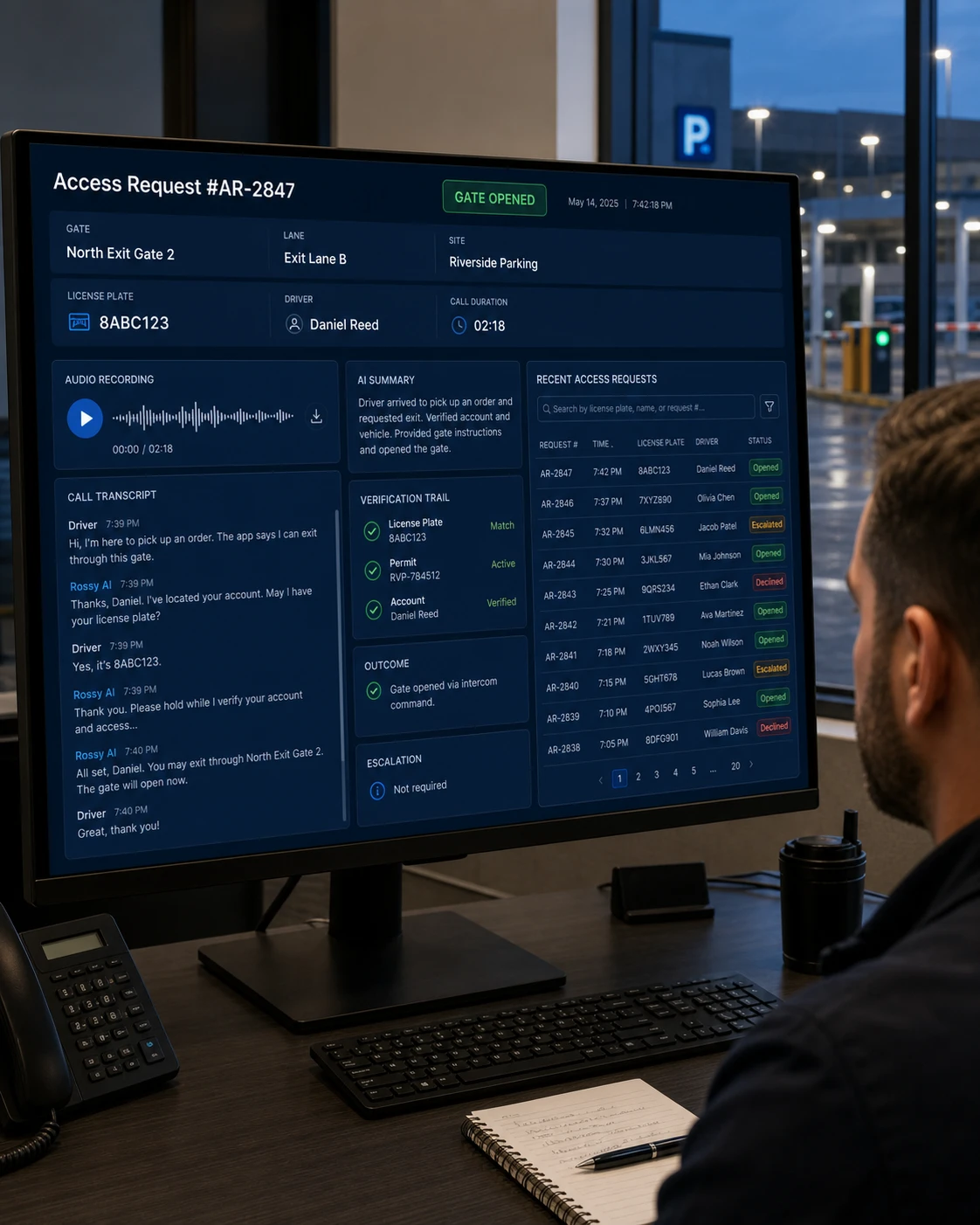
- Logs every call with a full recording, transcript, AI summary, verification trail and access outcome
From Intercom Call to Access Decision in Seconds
Coworking sells one thing above all others: the building is yours whenever you need it. Reception, meanwhile, is a nine-to-five cost. The gap between the two is a member standing outside their own office at seven on a Tuesday evening.
Traditional Office Entrance Workflow
- A member presses the intercom at the building door.
- Reception closed at five, or is dealing with a tour
- The call diverts to a community manager’s phone
- A member who pays for 24/7 access waits on the street
- Guests arrive and nobody knows who they are here to see
- Someone messages the host to ask if they are expected
- They unlock the door and explain where to go
- Interview candidates and clients wait outside a locked door
- No record exists of who was admitted, or as whose guest
With Rossy AI
- A member presses the intercom at the building door.
- Rossy answers the routed call
- Identifies the member, guest or attendee using available data
- Collects the membership, company, booking or host information
- Checks the connected coworking and reservation system
- Confirms access is permitted at that time
- Unlocks the building door when authorized
- Notifies the host that their guest has arrived
- Transfers unregistered guests and after-hours exceptions
- Records the interaction and outcome
How DTMF Door Access Works
DTMF stands for dual-tone multi-frequency. It is the technology behind the tones a telephone keypad produces when a key is pressed.
Telephone and SIP intercoms have accepted these tones as a remote door-release command for years. When a community manager presses a key on their phone to buzz a member in, the intercom hears that tone and triggers the relay connected to the door strike.
Rossy AI uses the same mechanism. After the required authorization conditions have been satisfied, it sends your intercom’s configured tone through the call that is already connected. The intercom or associated access system interprets that command and activates its configured relay, and the building door or office entrance unlocks.
We check your existing intercom, DTMF configuration and relay connection. Compatible systems may use existing hardware; any required changes are confirmed before deployment.
What Rossy AI Can Validate
Rossy AI verifies against the coworking and booking systems that already hold your records.
| Information | What Rossy AI checks |
|---|---|
|
Member name
| Name against current member records |
|
Membership status
| Whether the membership is active, expired, suspended or on a day pass |
|
Company name
| Whether the tenant company holds a current agreement and the caller belongs to it |
|
Meeting-room reservation
| Which room is booked, for what time, and by whom |
|
Host information
| Which member the caller is here to see, and whether that member is current |
|
Guest registration
| Whether the guest was registered, and by which member |
|
Event registration
| Whether the caller is registered for an event running in the space today |
|
Authorized access hours
| Whether the request falls inside the hours allowed for that membership tier |
Does Rossy AI Work With Your Building Intercom?
DTMF door access requires a compatible telephone or SIP intercom, connected to a door relay or access system, and configured to accept remote DTMF commands.
Generally compatible
- Building door intercoms and entry panels that dial out to a phone number
- SIP and VoIP intercoms on a network connection
- Cellular-connected entry panels at street entrances
- Systems where a community manager already unlocks the door using a keypad tone
Needs review before we commit
- Intercoms with no outbound dialing capability
- Panels wired only to a handset at reception
- Systems where remote release has been disabled in configuration
- Older analog units with no documented DTMF release command
- Mobile credential or badge-only entry with no intercom or telephone path
We will not tell you Rossy AI works with every intercom, because it does not. Before anything goes live, our team confirms your make, model, line type and configured door-release command, and tells you plainly whether it will work.
Connect Rossy AI With Your Existing Workspace Systems
Rossy AI connects to the systems that already hold your member and booking records, so verification runs against live data rather than a static list.
Setup is handled by our team. There is no code to write on your side.
Complete Visibility Into Every Access Request
Every intercom call produces a record, so your space can answer what a credential reader alone cannot: who came in, as whose guest, and what happened next.
- Full call recording and transcript for every interaction
- AI summary of who called, from which entrance, why, and what was decided
- Verification trail showing which record was checked and what was confirmed
- Guest log showing who was admitted and which member hosted them
- Host notification log showing who was alerted and when
- Access outcome recorded as unlocked, declined, or escalated
- Entrance identification across building doors, office entrances and locations
- Searchable history by date, entrance, member, company or outcome
How We Set Up Rossy AI for Your Space
Review Your Entrance Intercom Environment
We identify how your building door and office entrance intercoms receive calls, who controls each entrance in a shared building, how each is currently unlocked, and whether the system supports the required remote access workflow.
Define Your Access Rules
Determine access hours by membership tier, how guests are registered and hosted, how service providers and contractors are handled, what happens after hours, and which situations always require your facility manager.
Connect the Required Systems
Configure applicable integrations with your coworking management, booking, guest registration or access control platforms.
Configure DTMF & Call Routing
For compatible intercoms, configure the required call routing, DTMF command, and door relay behavior for each building door and office entrance.
Test Every Access Scenario
Test standard member access, day-pass and part-time tiers arriving out of hours, registered and unregistered guests, meeting attendees, interview candidates, service providers, expired memberships, transfer workflows and emergency routing before deployment.
Go Live & Monitor
We review early calls and refine your workflow. Your team can review outcomes and request ongoing support.
Ready to Automate Your Office Entrance?
Tell us how your current entrance intercom and coworking system work, and we will help determine the right Rossy AI setup for your space.
Frequently Asked Questions
Can Rossy AI let members in outside reception hours?
Yes. This is the main reason coworking spaces use it. Rossy answers configured intercom calls 24/7, checks membership status and authorized access hours for that tier, and can unlock the entrance for members who are entitled to be there.
How does Rossy AI handle a guest arriving to meet a member?
It checks whether the guest was registered and by which member, confirms that member is current, and can notify the host that their guest has arrived. Unregistered guests are transferred to their host, or to your facility manager where no host can be identified.
Can Rossy AI check a meeting-room booking at the door?
Yes, when the appropriate authorized system or integration is available. Rossy can confirm the room, the time and who made the reservation, and direct attendees to the right room once the door is unlocked.
Can different membership tiers have different access hours?
Yes. Rossy checks whether the request falls inside the hours allowed for that tier, so day-pass, part-time and full-access members are handled according to your rules rather than uniformly.
Can Rossy AI notify the host when someone arrives for them?
Yes, where that notification is configured. Rossy can alert the member by the channel you set up, which is often faster than a reception message and works when nobody is at the desk.
What happens when a membership has expired?
Rossy explains that access cannot be provided at this time and escalates to your facility manager. It does not process renewals or take payment on the call.
Does Rossy AI work if our street door belongs to the landlord?
That depends on who controls the entry panel and its release command. Where the street door is landlord-controlled, changes usually need their agreement. We check who controls each entrance during the review and tell you what is possible.
Does Rossy AI work with our existing intercom?
Compatibility depends on the intercom and access-control configuration. The system must support the required telephone or SIP calling workflow, DTMF signaling, and appropriate relay or remote-unlock configuration. We confirm this before deployment.