
- 99.99%RELIABLE SYSTEM UPTIME
- +35%INCREASE IN CALL RESPONSES
- 250K+CONVERSATIONS HANDLED
- 4K+WORKING HOURS SAVED
Automate Absence Reporting and Safe Arrival Calls
Rossy helps schools in the US and Canada handle parent absence reports and follow-up calls for unreported absences. Our team configures approved contact lists, questions, recording settings and escalation rules, then reviews early calls. School staff retain responsibility for unresolved cases and student welfare decisions.
How Rossy AI Helps Schools
Rossy AI works in two ways.
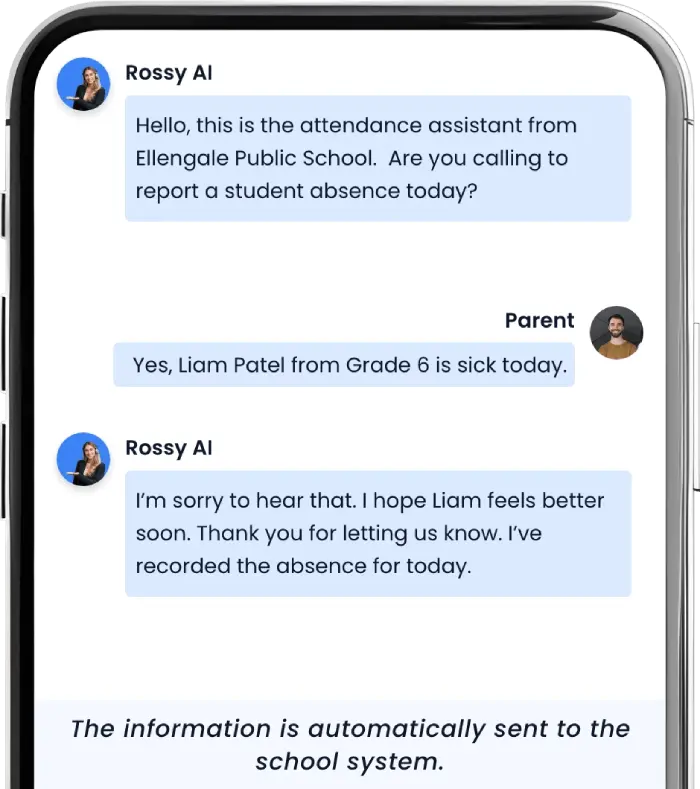
Parents Report Absences (Inbound AI)
Parents call the school attendance phone
number and speak with the AI assistant. Rossy
asks a few simple questions and records
the absence automatically.
AI Safe Arrival Calls (Outbound AI)
If a student is marked absent and the school
has not received an attendance report,
Rossy AI can automatically contact
the parent.


Natural Conversations (No Robotic Menus)
Rossy does not use “press 1 or press 2” style phone menus. Parents simply speak normally:
- He has a fever today
- We have a doctor appointment
- She will be late today
Rossy understands the reason and records the attendance automatically.
Parents can speak naturally; Rossy identifies itself as the school’s AI assistant.
Attendance Data Automatically Updates
We confirm which attendance system actions are supported before launch. Connected updates require authorized access; otherwise reports go to your approved staff workflow.
- PowerSchool
- SchoolMessenger
- Student Information Systems (SIS)
- Google Sheets
- Email notifications to school staff
Approved updates and staff review.

Morning Attendance Workflow
Before AI
- Attendance taken
- Staff check absence list
- Parents call and leave voicemail
- Staff listen to voicemail
- Staff manually update attendance
- Staff call parents for unreported absences
This process can take 1–2 hours every morning
After Rossy AI
- Attendance taken
- Rossy records parent absence reports automatically
- Rossy calls parents if absence is not reported
- Supported attendance updates are sent for review
Staff review unresolved cases
See How AI Attendance Automation Works
If your school office spends hours each week handling attendance calls and Safe Arrival verification, Rossy AI can automate the entire process.
Parents can report absences instantly, and the system can automatically contact parents when a student is absent without notice.
FAQ – AI Attendance Assistant for Schools
How do parents report student absences?
Parents call the school attendance phone number and speak with the AI assistant. The system records the student’s name, grade, and reason for absence.
What is a Safe Arrival system?
Safe Arrival follow-up helps staff check unexplained absences. Rossy can place approved calls and log responses; unanswered or unclear cases are escalated to school staff.
Can Rossy integrate with PowerSchool?
We confirm available PowerSchool access and supported actions before setup. A direct write-back is not assumed.
Do schools need new phone hardware?
We review your existing number and phone routing during setup, then confirm whether forwarding or another supported connection is needed.